Protected integration
Providence API
Start here to connect an approved sync client. This page explains how to get access and where to fetch the protected implementation reference.
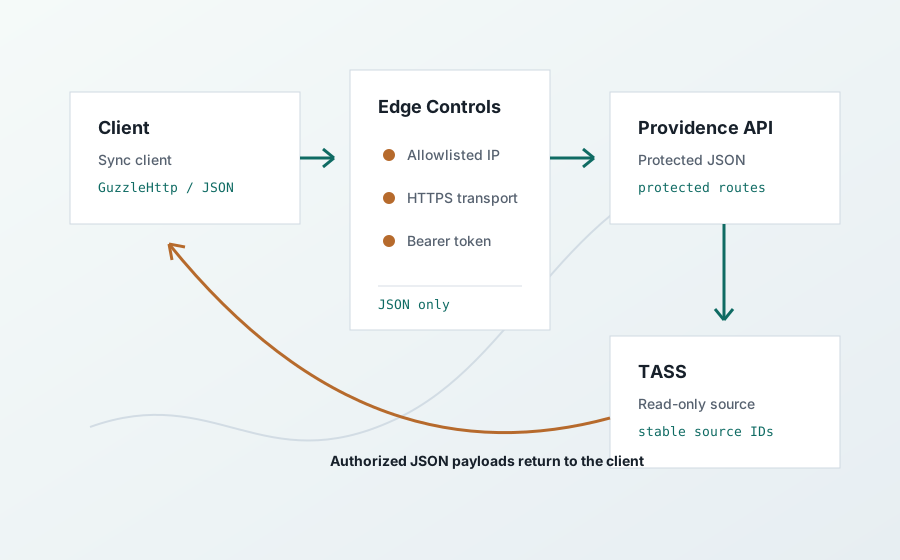
Bootstrap
What To Do First
- Give the API administrator the production source IP address your client will connect from.
- Receive a bearer token through a secure channel.
- Install the bearer token outside source control.
- Fetch the protected reference endpoint to get the full implementation contract.
Public Check
Confirm The Host Is Reachable
This check does not prove API access. It only confirms that the public web service is online.
curl "https://tassapi.providence.wa.edu.au/healthz"Access Package
Access Handover
Source IP
The API only accepts protected requests from an allowlisted client address. A valid token is not enough if the source IP is wrong.
Bearer Token
Send the token in Authorization: Bearer <token>. Do not put the token in URLs, logs, tickets, screenshots, or source control.
Protected Reference
Fetch The Full Contract
After the source IP is allowlisted and the bearer token is installed, fetch the protected reference endpoint. It returns the data endpoint list, schemas, query parameters, sync rules, ETag behavior, and error contract.
curl -H "Authorization: Bearer <token>" \
  -H "Accept: application/json" \
  "https://tassapi.providence.wa.edu.au/api/canopy/v1/reference"
Troubleshooting
What Failures Mean
- Wrong source IP returns an Apache
403 Forbidden, even with an otherwise valid token. - Missing or wrong bearer token returns a JSON
unauthorizederror after the source-IP control passes. - Success returns JSON from the protected reference endpoint.
Public Surface
Health and Documentation
The public site contains this bootstrap guide and GET /healthz. The protected endpoint map, schemas, source freshness, and live data are available only after the normal API controls pass.